

-
Notice regarding image hosts and attachments. See here.
-
Competitor rules
Please remember that any mention of competitors, hinting at competitors or offering to provide details of competitors will result in an account suspension. The full rules can be found under the 'Terms and Rules' link in the bottom right corner of your screen. Just don't mention competitors in any way, shape or form and you'll be OK.
You are using an out of date browser. It may not display this or other websites correctly.
You should upgrade or use an alternative browser.
You should upgrade or use an alternative browser.
**THE NVIDIA DRIVERS THREAD**
- Thread starter Boomstick777
- Start date
More options
Thread starter's posts


Just read this for Rivatuner/MSI Afterburner users
in addition to installing the most recent SmoothMotion aware 7.3.7 betas I’d additionally recommend enabling “Use Microsoft Detours API hooking” option in RTSS properties for SmoothMotion in D3D11 games. It will improve compatibility with SmoohMotion’s D3D11 hooking behaviour and eliminate possible OSD flickering in such apps. Probably in future builds I’ll forcibly enable this options for processes which load SM’s hook module.
Same as every driver after 596.49 is a downgrade in performance for me..tempted to get new drivers, im on 596.49 but really dont want to run benchmarks to see if worth

Soldato
- Joined
- 19 Feb 2007
- Posts
- 16,190
- Location
- Sol
Not mine but I saw this on the hive of scum and villainy known as Reddit, The new driver is definitely nice especially if you've been holding out on the 500 series branch.
Assassins Creed Shadows benchmark, Top is new driver, Bottom is old driver.
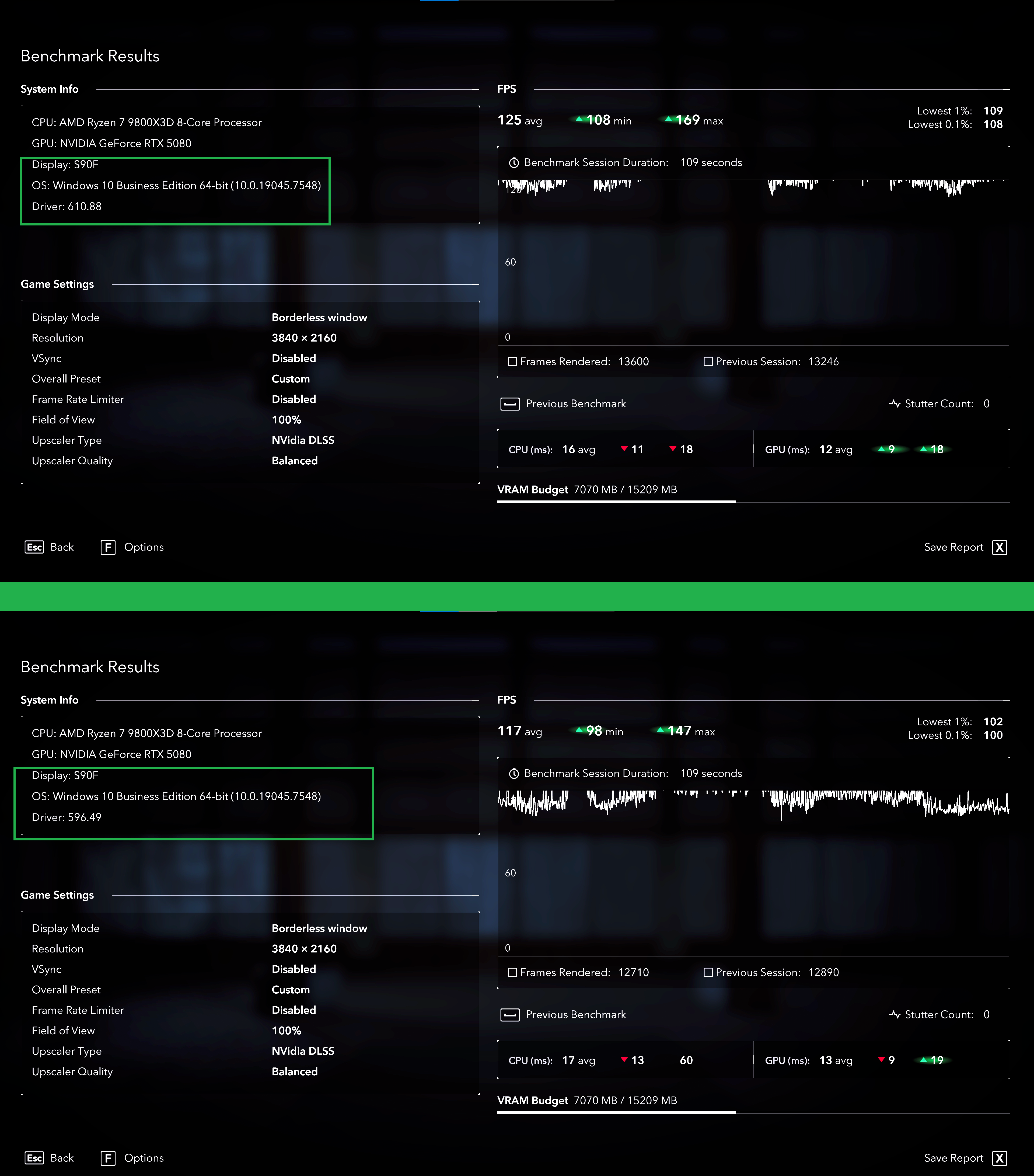
Assassins Creed Shadows benchmark, Top is new driver, Bottom is old driver.
Last edited:

hah i was just coming here to link that and say im passing on the update/downgradeStill sticking with the 596.49 seems none of the 610 branch have fixed the performance regression from 596.49 onwards..

Associate
- Joined
- 18 Feb 2024
- Posts
- 232
- Location
- UK
Yeah been fine for me, gsync is off as VRR flicker is still a thing with OLED as always.
Whats the best way to cap the framerate when using an OLED? Gsync off, Vsync off and cap framerate in NVCP/app?
I have a global fps cap in Nvidia driver at 237fps (3fps below my max refresh) and form there I just use either ingame fps cap if available or RTSS.
You can also use the Nvidia driver to cap on a per game basis but that means going into the app to change it any time you want to test stuff out whereas RTSS is a keyboard shortcut and ingame is done in game.
Otherwise yes global Vsync off, Gsync off and max framerate 3fps below your monitor's max to prevent any chance of overshoot.
You can also use the Nvidia driver to cap on a per game basis but that means going into the app to change it any time you want to test stuff out whereas RTSS is a keyboard shortcut and ingame is done in game.
Otherwise yes global Vsync off, Gsync off and max framerate 3fps below your monitor's max to prevent any chance of overshoot.
Soldato
- Joined
- 19 Feb 2007
- Posts
- 16,190
- Location
- Sol
I have a global fps cap in Nvidia driver at 237fps (3fps below my max refresh) and form there I just use either ingame fps cap if available or RTSS.
You can also use the Nvidia driver to cap on a per game basis but that means going into the app to change it any time you want to test stuff out whereas RTSS is a keyboard shortcut and ingame is done in game.
Otherwise yes global Vsync off, Gsync off and max framerate 3fps below your monitor's max to prevent any chance of overshoot.
I genuinely don't seem to see any flicker from G-Sync on my OLED, Is it only certain types it happens with ?
I genuinely don't seem to see any flicker from G-Sync on my OLED, Is it only certain types it happens with ?
Nor me...
Last edited:
Certain types of games which use certain dark shades of grey with a combination of frametime pacing. Once you notice it you will always notice it, especially if you are the type who can notice LED lightbulb flicker out of the corner of your eyeshot and stuff like that.I genuinely don't seem to see any flicker from G-Sync on my OLED, Is it only certain types it happens with ?
Last edited:
Soldato
- Joined
- 19 Feb 2007
- Posts
- 16,190
- Location
- Sol
Certain types of games which use certain dark shades of grey with a combination of frametime pacing. Once you notice it you will always notice it, especially if you are the type who can notice LED lightbulb flicker out of the corner of your eyeshot and stuff like that.
I notice LED bulb flicker but honestly cannot say the same for my monitor, Maybe LG did something good, Minus the forced bloatware
NVIDIA GeForce 620.12 Shader Model 6.10 Preview Driver
Official Link (Must have NVIDIA Account): https://developer.nvidia.com/downlo...ready_win11_win10-dch_64bit_international.exe
GDrive Alternative Link: https://drive.google.com/file/d/1zDGOk7CztT6hqu1UYbYPIQzv7nU9tzvG/

Official Link (Must have NVIDIA Account): https://developer.nvidia.com/downlo...ready_win11_win10-dch_64bit_international.exe
GDrive Alternative Link: https://drive.google.com/file/d/1zDGOk7CztT6hqu1UYbYPIQzv7nU9tzvG/
Last edited:
Soldato
- Joined
- 19 Feb 2007
- Posts
- 16,190
- Location
- Sol
Wonder if that'll have any benefits for non developers.
Wonder if that'll have any benefits for non developers.
Just beta tested these drivers, didn't get a chance to actually game with them
"Error code: STATUS_ACCESS_VIOLATION"
Kept on happening on websites that had videos.
So back to studios

NVIDIA GeForce Vulkan Developer Driver 596.97 BETA (8-3-2026)
August 3rd, 2026 - Windows 596.97, Linux 595.44.13
August 3rd, 2026 - Windows 596.97, Linux 595.44.13
- New:
- VK_EXT_image_tiling_control
- Added NV16 (8-bit 4:2:2) and P216 (10-bit 4:2:2) format support for H.264/H.265 decode on Blackwell
- Added P016 (10-bit 4:2:0) format support for H.264 decode on Blackwell
- Fixes:
- Fixed DontInline functionality crashing under some circumstances
- Fixed regression with AV1 encode introduced in previous beta driver
- Improve interoperability of video format images with CUDA
- Miscellaneous minor Vulkan Video fixes