


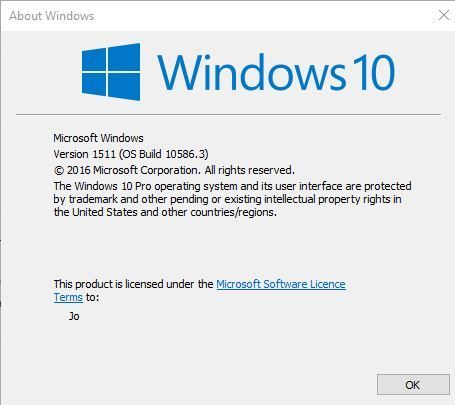
After the upgrade if you look in something like Control Panel at the help menu > About Windows it should show...
Version 1511 (OS Build 10586.3)
Or run command winver
Last edited:
After the upgrade if you look in something like Control Panel at the help menu > About Windows it should show...
Version 1511 (OS Build 10586.3)


Updated mine with the upgrade, took about an hour, all done and on the latest version
https://www.microsoft.com/en-gb/software-download/windows10
just click on upgrade now
Doesn't matter that your already on win 10, it will just upgrade you to the latest version
Updated mine with the upgrade, took about an hour, all done and on the latest version
https://www.microsoft.com/en-gb/software-download/windows10
just click on upgrade now
Doesn't matter that your already on win 10, it will just upgrade you to the latest version
Even this doesn't work for me. Wonder whats stopping it, just says its failed on that.
I had the same issue on windows 8.1 upgrading to 10. Maybe I have disabled some service...
There's some news about it failing for those that are using SD card memory but maybe also if you have additional USB devices that you don't need connected whilst upgrading you could remove these too if this applies to you.

I've had some bad experiences with them messing with my pc so good luck with that hopefully its something simple.
Updated mine with the upgrade, took about an hour, all done and on the latest version
https://www.microsoft.com/en-gb/software-download/windows10
just click on upgrade now
Doesn't matter that your already on win 10, it will just upgrade you to the latest version
Does it just use my serial key already in Windows 10?
Or must I manually add one?


