50MB Virgin Media

I do hit 6.9 sometimes, ok to say i get it constantly was a bit OTT :)

That'll just be your software reporting incorrectly, which it's prone to do (especially at the start of a transfer session). It's physically impossible for a connection which is hard capped at 53Mbps to output 6.9MB/sec (which is 55.2Mbps).
 
That'll just be your software reporting incorrectly, which it's prone to do (especially at the start of a transfer session). It's physically impossible for a connection which is hard capped at 53Mbps to output 6.9MB/sec (which is 55.2Mbps).

hmm maybe it is.

When i first click connect, it jumps to say 6.85 and then drops down to just under 6.4 like i showed earlier.
 
That'll just be your software reporting incorrectly, which it's prone to do (especially at the start of a transfer session). It's physically impossible for a connection which is hard capped at 53Mbps to output 6.9MB/sec (which is 55.2Mbps).
It is not impossible Virgin's cable speeds have been known to spike sometimes I have personally had downloads in the range of 7MB/s but not for very long. And had downloads start off high and fall down to normal speed after (which i doubt would be program miscalculation as it has only happened a few times)
For the past week and a half my internet has been atrocious, and I'm with VM 10Mb ADSL iirc. This is probably the first time in 4 years its been this bad.

906816231.png


Oh and no I haven't gone over any type of cap, the horrid speeds I've been getting make it physically impossible for me to reach any sort of cap :p

Last Sunday:

898951722.png


Also notice that was done during off-peak hours, not good.

Are you on adsl or cable, if your on cable you can probably get your problems sorted. If you have adsl you will probably have a modem/router but with cable you will probably have a modem and a router if you think you are on cable try going here And if it comes up your user and password will be root and then go to the downstream and upstream stats and post your power levels.
 
Last edited:
As I said above mate, he was wrong to say 6.9MB/sec but the figures he now (much more accurately) quotes are easily correct. Again as I said earlier, VM actually provide 53Mbps not 50Mbps (check your modem config file). I also get 6.32MB/sec downstream, which is almost 51Mbps. That, I can believe. 6.9 was just too high however. ;)

Ah there we go then, I knew it wasn't possible to get more than 6.25 on a 50Mbit connection :p

What would my 10MB profile be, 10.4 or something?
 
It is not impossible Virgin's cable speeds have been known to spike sometimes I have personally had downloads in the range of 7MB/s but not for very long. And had downloads start off high and fall down to normal speed after (which i doubt would be program miscalculation as it has only happened a few times)

That happens with ADSL also... I used to get 2MB/s on my 7Mbps connection or a few seconds.
 
When I first got 50mb on VM I got 6400KB/s down, ended up needing a replacement modem and now its around 6200KB/s. It always maxes out though, I never have any speed issues. What I do have is downtime, sometimes the connection will just drop for a bit. It's annoying but it doesn't happen that often.
 
Are you on adsl or cable, if your on cable you can probably get your problems sorted. If you have adsl you will probably have a modem/router but with cable you will probably have a modem and a router if you think you are on cable try going here And if it comes up your user and password will be root and then go to the downstream and upstream stats and post your power levels.

Yeah cable.

Downstream Lock : Locked
Downstream Channel Id : 4
Downstream Frequency : 402750000 Hz
Downstream Modulation : QAM256
Downstream Symbol Rate : 5360.537 Ksym/sec
Downstream Interleave Depth : taps32Increment4
Downstream Receive Power Level : 7.5 dBmV
Downstream SNR : 32.7 dB

Upstream Lock : Locked
Upstream Channel ID : 4
Upstream Frequency : 29200000 Hz
Upstream Modulation : QPSK
Upstream Symbol Rate : 2560 Ksym/sec
Upstream transmit Power Level : 44.5 dBmV
Upstream Mini-Slot Size : 2
 
I get a connection of around 51MB

It is brilliant although I don't know what to download. There's only so much you can download before you get bored.

I'd download 24/7 if I could. I get just over 6mb/s on giganews. The connection is solid and fantastic. Sometimes I feel like I need 200mb line but then I'm always after more.

TBH 10MB would be enough for me I'm just greedy!
 
Do you have a problem with download speed?

The engineer who came to install my connection stated that they like to keep the power levels as close to 0 as possible.

Power Level
(dBmV) -0.43 -0.68 -0.61 -1.25
download speed i get around 51-52Mb.

but browsing is slow sometimes :confused:
 
My installation went as follows:

Waited 8am-1pm and nothing, then the engineer calls and says he's late. Arrives at 2:30pm.
Engineer starts messing with the phone line, then leaves (complains he hasn't had lunch!) and comes back in an hour and says it's working (They also don't give the poor guys umbrellas!).
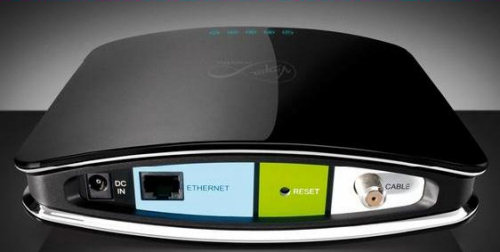
Then plugs in the cable modem and starts calling to activate it. I tell him it's the WRONG MODEM and it doesn't support DOCSIS 3.0. He doesn't know what DOCSIS is and says it's the right one.
WHen lights start blinking he tells me to connect my PC and open my browser to complete the registration/activation process. I must say, this is what probably costs them hundreds of thousands of pounds in lost time, labour and technical support that's not necessary. The silly installation wants me to install some bloatware, i say NO, and then it restarts and says it's activated. But then? No, it doesn't work! It says "Call support".
So the engineer says the modem is broken, I just tell him it's the wrong modem and wouldn't even give me 50Mbit.

A few minutes later someone manages to give him a proper modem (The one they advertise) and it took 5 minutes for it to connect and running a speed test I managed to get 3Mbit, then it just died and wouldn't work. THeir advice was to wait for 30 mins, I did. ANd then I got my 50/1.6.
909928609.png

So, yet again another avoidable problem which could have been made much easier for the poor engineer and myself.

Oh, and they forgot to give him a router, so my beloved WRT54G can only handle 36Mbit WAN>LAN.

Ordered a WRT610N to replace it.

Also, I decided to tell my router to use Google Public DNS instead of VM's. I think if anyone is having browsing issues, you should make the switch too. The DNS servers are 8.8.8.8 and 8.8.4.4 try searching on Google for Public DNS for more info.


vm_modem.jpg
 
Last edited:
Back
Top Bottom