


Media Player PC

Hmm, I'd trust the specs more than the review, but I don't know! Might be best to give them a ring or sent a a webnote before you buy it to check. Based on its size I think it should fit two!
 
Windows Media Center will be your best bet, you can get a load of pluggins which allow you to grab all the shows from 4oD, iPlayer etc.

nevermisstv used to be one, not sure if its still useable.

XBMC can probably be used as well. Although I have never tried it with the streaming addons.
 
Windows Media Center will be your best bet, you can get a load of pluggins which allow you to grab all the shows from 4oD, iPlayer etc.

nevermisstv used to be one, not sure if its still useable.

XBMC can probably be used as well. Although I have never tried it with the streaming addons.

cheers, i have googled it and there do seem to be a fair few pluggins floating around for it, so will give it a go. XBMC is linux based isnt it? think i gave that a go and couldnt really work it out.
 
XMBC can be ran on Windows, Linux or as they call it "live".

The live version boots into a linux distro (I believe it is a version of ubuntu) and immediately runs xbmc. So it looks like you turn it on and get straigh into the program. I use it on one of mine. Perfect if you don't want to do anything other than play files from another location.
Once you figure it out its ok. If you have a play with it on windows you get used to it and it has a few nice features. (v.11 is out soon with some desperatly needed upgrades!) If you fancy trying it I don't mind lending a hand. (main learning curve is the scrapers and media locations.

My favourite feature is you can program a remote to do specific things depending on buttons presses.

You should be able to find a windows MCE remote fairly cheaply and that can be customised - I believe to a reasonable extent.
 
It has a few downsides (like the fact it [still] refreshes @ 60fps which uses CPU even though its doing nothing!) But once you get the hang of it and change the skin it looks the business
 
yeh i was thinking of the XBMC live version, could run that off a USB stick and have my media drive fitted internally then, that way it would stop the need for have them on another pc and networking (would then save me paying electric on a pc that is doing nothing but hosting the files). might have a look at it, do you know if there are any good customised live versions which have a user friendly skin/interface?
i have a cheap media center remote already, so thats sorted, is very cheap though, so not sure how well it would work with XBMC.
 
As long as the motherboard can boot from USB I can't see why not, its not a large distro.
Only issue I can forsee is that all the media info will then be downloaded onto the USB stick all well, as long as its a decent size it should be fine

Once you have installed it you can change the skin to which ever you prefer (addons - skins). I'm using Neon at the moment - I like it because if you hit "down" on any movie you get the trailer (streamed), nice touch I think. But the standard "confluence" is fairly ease to get to grips with.

You can get an addon which allows all MCE remotes to work with it, so it should work fine.

Download it for your PC first and have a play. Going straight into live can be annoying!
 
As long as the motherboard can boot from USB I can't see why not, its not a large distro.
Only issue I can forsee is that all the media info will then be downloaded onto the USB stick all well, as long as its a decent size it should be fine

Once you have installed it you can change the skin to which ever you prefer (addons - skins). I'm using Neon at the moment - I like it because if you hit "down" on any movie you get the trailer (streamed), nice touch I think. But the standard "confluence" is fairly ease to get to grips with.

You can get an addon which allows all MCE remotes to work with it, so it should work fine.

Download it for your PC first and have a play. Going straight into live can be annoying!

lol dont really want to install it in windows as that can be a pain, running live is a lot easier from my point of view coz if anything goes wrong, unplug the usb stick and all is good again :)
will be on a 4GB or 8GB stick so and the distro is only 500mb, so should be plenty of room for pluggins and stuff.
 
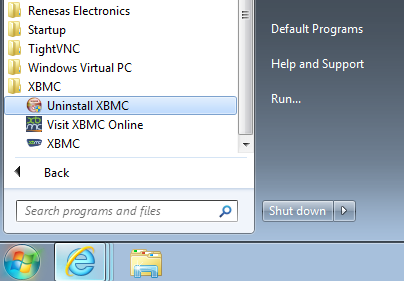
I mean't on your current PC before installing it on your new hardware. It runs just like any other program on windows, its like opening media center. You can remove it just as easily.
xbmc.png


(yup I even installed it on my work PC - shhh)
 
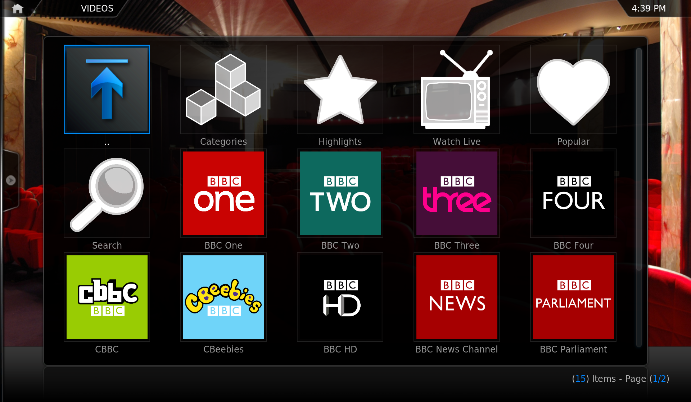
lol just gave the live disc a go on my laptop, but it wont find an internet connection :( i know i have had this problem with a lot of the linux live distros and my laptop, so hopefully a wired connection will resolve it on the new pc. does XBMC support pluggins for things like bbc iplayer?
 
That it does :)
iplyeraddon.png


Just tested it as well. works fine.

cheers for that :) just plugged an ethernet lead into my laptop and it connected to the interent, so looks like i will be able to get away with it :)

is bbc the only one it supports or should i be able to find most of the channels catchup stuff?
 
i installed the plugins for itv player and iplayer, but i just get it in list form not pictures like yours, is that the overall skin, or a setting?
 
When you're on the list, hit left on you keyboard and you will bring up the menu.

Go to view, then hit enter until you get "thumbnail"
 
Back
Top Bottom

