

You are using an out of date browser. It may not display this or other websites correctly.
You should upgrade or use an alternative browser.
You should upgrade or use an alternative browser.
Media Player PC
- Thread starter paradisiac
- Start date
More options
Thread starter's posts

- Joined
- 22 Mar 2009
- Posts
- 7,754
- Location
- Cornwall
any idea why its not seeing my hard drives?
It will be because they are NTFS drives which need to be mounted (as it is in theory a linux OS)
From XBMC forum:
From XBMC forum:
I edited the syslinux.cfg file on the root of my usb flash drive, removed the nodiskmout command using wordpad and now it recognizes the NTFS drive.
- Joined
- 22 Mar 2009
- Posts
- 7,754
- Location
- Cornwall
It will be because they are NTFS drives which need to be mounted (as it is in theory a linux OS)
From XBMC forum:
thanks for that

- Joined
- 22 Mar 2009
- Posts
- 7,754
- Location
- Cornwall
right well all of that is sorted, so in theory will be good, aslong as the new mobo is compatible. cant get audio through HDMI on my pc 

Soldato
- Joined
- 10 Aug 2010
- Posts
- 5,508
- Location
- Somerset
right well all of that is sorted, so in theory will be good, aslong as the new mobo is compatible. cant get audio through HDMI on my pc
Is it set as the default output device in windows?
- Joined
- 22 Mar 2009
- Posts
- 7,754
- Location
- Cornwall
Is it set as the default output device in windows?
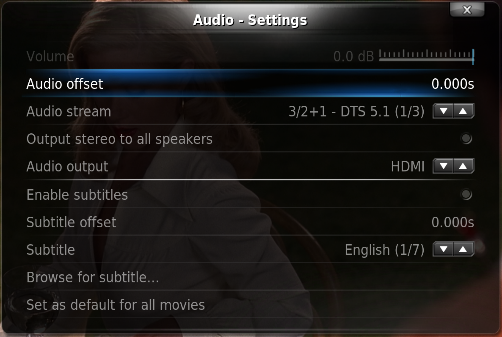
in XBMC (not using windows as this seems like a faster system as all it will be doing is playing video files and online video content) live cd i have changed it to default but still no audio
- Joined
- 22 Mar 2009
- Posts
- 7,754
- Location
- Cornwall
yeh tried that, everying is set to HDMI but no audio out. not to worry im sure it will work on the new stuff
have you used XBMC as a live disc/install? my worry is, how am i going to add new video files to the hard drive? does it have network sharing options so i can see it in my windows 7 machine and just dump files over?
have you used XBMC as a live disc/install? my worry is, how am i going to add new video files to the hard drive? does it have network sharing options so i can see it in my windows 7 machine and just dump files over?
It is a bit tricky, the best thing to do is before you add your HDD to the new build:
Pop it back into your PC and set the sharing / permissions for the whole drive to be "everyone", then you can, like you said, just dump files onto it from your PC.
I used the live version but everything is streamed from my media server.
I did used it like you did, but the moment you exceed 2 x 3.5" drives then you either have a massive HTPC case or you need to look at other options.
I now have 10TB of data, blu rays are big!
Pop it back into your PC and set the sharing / permissions for the whole drive to be "everyone", then you can, like you said, just dump files onto it from your PC.
I used the live version but everything is streamed from my media server.
I did used it like you did, but the moment you exceed 2 x 3.5" drives then you either have a massive HTPC case or you need to look at other options.
I now have 10TB of data, blu rays are big!
- Joined
- 22 Mar 2009
- Posts
- 7,754
- Location
- Cornwall
It is a bit tricky, the best thing to do is before you add your HDD to the new build:
Pop it back into your PC and set the sharing / permissions for the whole drive to be "everyone", then you can, like you said, just dump files onto it from your PC.
I used the live version but everything is streamed from my media server.
I did used it like you did, but the moment you exceed 2 x 3.5" drives then you either have a massive HTPC case or you need to look at other options.
I now have 10TB of data, blu rays are big!
wow that is a lot of data lol i shouldnt be anywhere near that amount, well not for a while anyway, and cant really justify paying electric for 2 pcs to be running (that was my original thought) as my current pc (in sig) is already connected to the tv for when i play games, so i currently use that for films too. but it is quite power hungry, so thought if i could find a way of getting a low powered pc to just do my media would save my having that on too.
My server is powered by an absolute beast of a cpu.... an e2140 
I have Windows Home Server 2011 with the lights off pluggin which powers the server down if no HDDs are being used or backups are occuring. quite useful.
I'll measure the power draw tonight just for info.
I have Windows Home Server 2011 with the lights off pluggin which powers the server down if no HDDs are being used or backups are occuring. quite useful.
I'll measure the power draw tonight just for info.

- Joined
- 22 Mar 2009
- Posts
- 7,754
- Location
- Cornwall
I use the Alaska or was it Akasa skin on XBMC... Looks pro
Also, consider getting an SSD inside the PC.. Only a small one, install the live version of XBMC on the SSD and watch it fly
got a 60GB SSD in my pc, thinking i might use that if the usb stick route is too slow, dont really see much gains on my pc as all my other programs are on a mechanical drive anyway, the only real difference is loading into windows and launching web browsers.
- Joined
- 22 Mar 2009
- Posts
- 7,754
- Location
- Cornwall
The other alternative is to buy an AppleTV for £90.. hack it with XBMC.. done
that sounds like a lot of hassel, and most probably illegal
Its not illegal and the whole process takes about 10mins; its basically a jail break which stopped being illegal a long time ago
In my lounge I have a PC
http://www.zotac.com/index.php?option=com_wrapper&view=wrapper&Itemid=100083&lang=en
This has windows on it with XBMC running. XBMC auto starts with windows and I have other apps running the background like Dropbox and uTorrent
All files are stored on a £50 Netgear Stora with 2 X 2TB disks
http://www.netgear.com/stora
Then in the bedroom I have an Apple TV Jailbroken running XBMC.. this connects over my 802.11n network to the stora and streams
works very well
In my lounge I have a PC
http://www.zotac.com/index.php?option=com_wrapper&view=wrapper&Itemid=100083&lang=en
This has windows on it with XBMC running. XBMC auto starts with windows and I have other apps running the background like Dropbox and uTorrent
All files are stored on a £50 Netgear Stora with 2 X 2TB disks
http://www.netgear.com/stora
Then in the bedroom I have an Apple TV Jailbroken running XBMC.. this connects over my 802.11n network to the stora and streams
works very well
- Joined
- 22 Mar 2009
- Posts
- 7,754
- Location
- Cornwall
but then i would also need to purchase a media server of some kind, which would in the end cost more than a £40 mobo and maybe a £40 media centre case.
- Joined
- 22 Mar 2009
- Posts
- 7,754
- Location
- Cornwall
ok so ordered the case, might aswell do it all in one go, so spec is as follows :
Intel PENTIUM G620 SK1155 2.6GHZ DUAL CORE
ASRock H61M/U3S3
2GB RAM
8GB USB Stick or 60GB SSD (XBMC LIVE)
1TB WD Black HDD (DATA)
OcUK Opera Media Case - Black (with 500W PSU)
does this sound like it should be ok as a media center? still debating whether to go with windows 7 or XBMC (mainly for ease of use and transfering files to the drive).
Intel PENTIUM G620 SK1155 2.6GHZ DUAL CORE
ASRock H61M/U3S3
2GB RAM
8GB USB Stick or 60GB SSD (XBMC LIVE)
1TB WD Black HDD (DATA)
OcUK Opera Media Case - Black (with 500W PSU)
does this sound like it should be ok as a media center? still debating whether to go with windows 7 or XBMC (mainly for ease of use and transfering files to the drive).
Soldato
- Joined
- 10 Aug 2010
- Posts
- 5,508
- Location
- Somerset
Looks good to me
Can't comment on the software as I know nothing about XBMC1
Can't comment on the software as I know nothing about XBMC1