Media Player PC

yeh, im prefering it in as much as thats all it does, its a media player. if i could get windows 7 to load into full media center from boot without all the other annoying parts of antivirus software and stuff popping up and other startup programs disrupting it.

 
Looks good, If you added an SSD then windows would boot and run XBMC within an acceptable amount of time.

but would i need a keyboard and mouse to launch XBMC?
this is what im trying to avoid, i want to just turn it on, and then its boots to a media player only, so can get away with just the remote (unless i choose to do something other than media stuff).
plus if i run windows and its on the net, i will need AV software, when scan kick in, will this affect the media player (make it lag or change it from full screen) or will it (i know avg use this feature) go into a 'game' mode when pc is in full screen and stop all scans. if this is the case, and for 99.99% of the time it will be in full screen mode, how protected would i be?
 
Nah you can stick xbmc into your startup folder and it will load as soon as it can.

if you aren't surfing the web on it you won't need antivirus software really. but if you do add it, then Microsoft Security Essentials is one of the "quieter" ones. Also when you run a scan on an SSD it takes about 30secs.

My vertex2's take a max of a minute to run a scan.
 
Nah you can stick xbmc into your startup folder and it will load as soon as it can.

if you aren't surfing the web on it you won't need antivirus software really. but if you do add it, then Microsoft Security Essentials is one of the "quieter" ones. Also when you run a scan on an SSD it takes about 30secs.

My vertex2's take a max of a minute to run a scan.

hmmm.......so this might be a better option, and im guessing doing it this way, XBMC uses windows drivers? so i shouldnt get similar issues with the HDMI audio like i was getting last night with my gaming pc booting from a live disc.
 
You got it.
windows will drive the audio, xbmc will do as its told!! It will also make file transfers easier! (massive downside of xbmc live, but if you have a media server its fine :) - had to add a little defense)
 
Also you can set in MSE how much of the CPU you will allow it to use while scanning (though I'm guessing it may be the HDD that is the problem while scanning not the CPU?)
 
now you have me thinking, do i just rip my SSD out of my gaming pc as i dont see any gains from it in there, or do i run it with XBMC Live on a usb stick and probably end up getting frustrated with it.

with the case i have ordered, say it will only take a combination of 2 drives, i wont need an optical drive in this machine once windows is installed, so would i be able to get 2x3.5 drives in there and tuck the 2.5 SSD somewhere out the way? or is the case gunna be quite compact?
 
You can install Windows off a USB stick, no need for an optical drive at all then if you don't need it :P

Not sure on the case size sorry. Might be worth a try when you get it. Try a few different ways and see which works best!
 
You can install Windows off a USB stick, no need for an optical drive at all then if you don't need it :P

Not sure on the case size sorry. Might be worth a try when you get it. Try a few different ways and see which works best!

could do it off usb, that is normally quick the dvd too isnt it?
i would have liked a blue ray drive, but cant justify the price at the moment, so until i have some spare cash for one of those and a 3TB hdd then i will require 2 3.5 drives in the machine.
 
Yeah the last 10 or so installs (on various PCs) I've done with a stick and I think its marginally faster. I just do it as its more convenient. For instance not burning another DVD now SP1 is out.
 
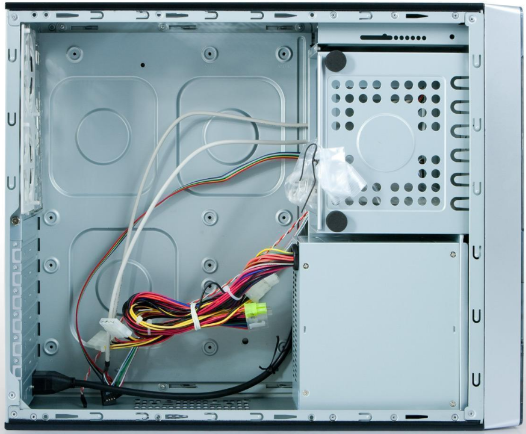
heres the insides:

OperaCase.png


You maybe be able to mount it on the bottom side of the case where you should have quite a bit of space with your small mobo choice.

There won't be much in it as you have to copy the files to the USB stick 1st. but it will be easier than connecting up a dvd drive!
 
Last edited:
heres the insides:

OperaCase.png


You maybe be able to mount it on the bottom side of the case where you should have quite a bit of space with your small mobo choice.

should easily go below the motherboard then as it only has 3 card slots :) looking at the pic, might even be able to fit a 3.5 drive down there too.
 
I'd get 4GB. its only £20 and windows 7 + XBMC (just checking) on my PC is using around 1.5GB, when videos play the G620 will use some for video processing aswell.

It can't hurt :)
 
I'd get 4GB. its only £20 and windows 7 + XBMC (just checking) on my PC is using around 1.5GB, when videos play the G620 will use some for video processing aswell.

It can't hurt :)

right, will look into more ram too. what was gunna be a £47 motherboard, has now turned into a £47 mobo, £40 case, loosing the SSD from my gaming pc, and probably another £20 on ram lol.
 
seeing as i have 2GB already, will see how i get on with that and save. is there any way of streamlining windows 7 so its less resource hungry? i know its pretty good out of the box, but any tweaks i should know about?
 
Back
Top Bottom