• Notice regarding image hosts and attachments. See here.

  • Competitor rules

    Please remember that any mention of competitors, hinting at competitors or offering to provide details of competitors will result in an account suspension. The full rules can be found under the 'Terms and Rules' link in the bottom right corner of your screen. Just don't mention competitors in any way, shape or form and you'll be OK.

**THE NVIDIA DRIVERS THREAD**

Edit*
Coipy pasting from the STALKER 2 thread...

I did some extended research and testing last night with Reflex, capping, latency etc thanks to the help of DLSS Enabler which has really good stats overlay showing each part of the latency pipeline end to end, alongside Steam's overlay stats in STALKER 2:


This game reacts really well to injecting MFG, I thought about testing it out to further lower GPU overhead and thus fan noise and reference against not only input latency but frame time queue and general pacing performance that could result in realistic or perceived "lag".

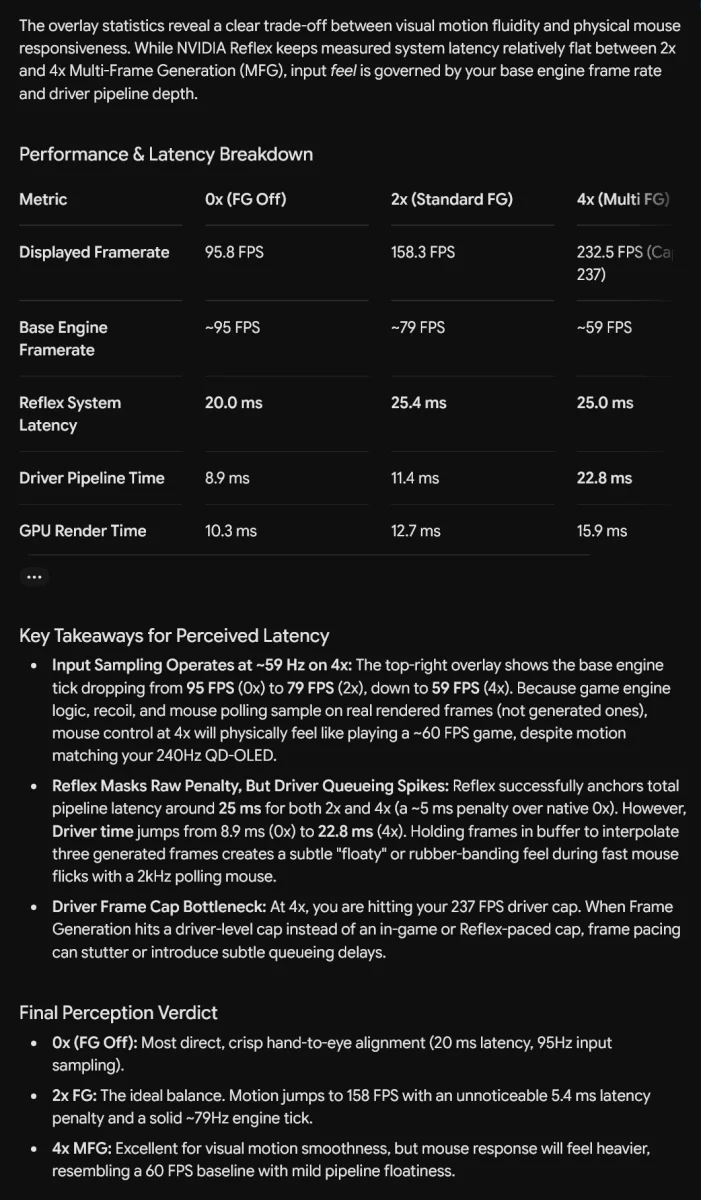
I then let Gemini analyse the DLSS Enabler metrics overlay on each screenshot:

Base settings in game: Epic preset / DLSS Quality / 4K output

FG disabled:
0x.jpg


2xFG:
2x.jpg


4xMFG:
4x.jpg


Gemini:
1787360908711.webp


The verdict at the end is bang on really, 4x is more than playable, but 2x is the best balance as 5ms latency introduction going from an average 95fps to a locked 120fps offers a noticeable motion experience with no perceptible introduction of mouse input latency.

I noted my preference for RTSS since it uses Reflex hook anyway so adds no additional latency into capping like the Nvidia control panel or NVapp driver level global cap does, Gemini said:
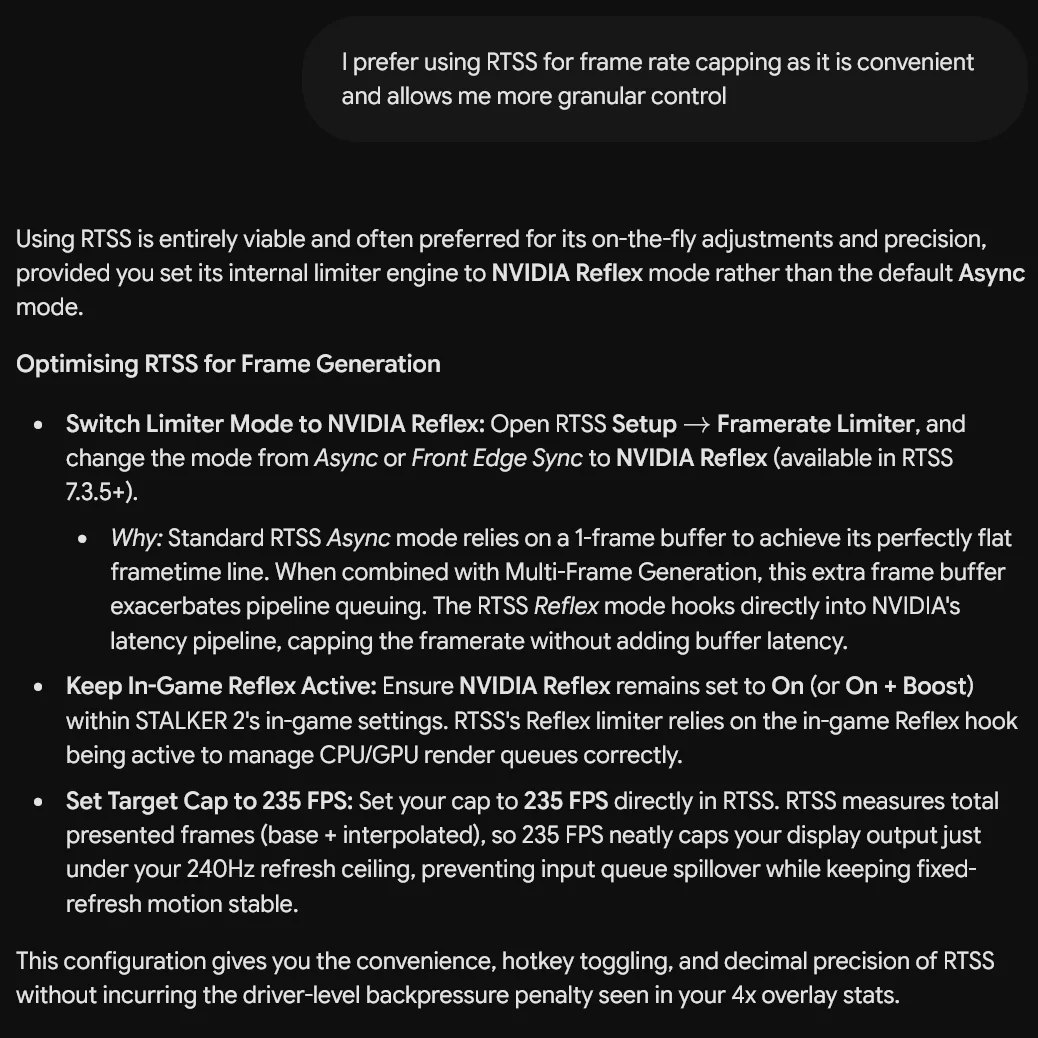
1787360919841.webp


An interesting test in an engine I wasn't expecting to fare so well with injecting a mod this way.

The takeaway from this is I learned having the max fps cap in the nvidia driver is not the most optimum way because that cap is applied at the end of the pipeline, not at the start which is where Reflex is doing its thing (and in turn RTSS with its Reflex hook).

So optimum usage is Gsync on + Vsync on for those who don't notice any OLED VRR flicker, for those who do on their displays, both off and set your framerate caps either ingame or with RTSS and have reflex on. This keeps end to end latency as low as possible and the GPU driver is not adding any extra ms into the render pipeline.

Nvidia low latency mode etc are obsoleted by Reflex so these legacy settings can be disregarded.

My optimum routine then is if a game offers a max fps cap and reflex as settings in the menu, then I have that set to 235fps/237fps and Reflex on, then RTSS is used to cap a lower fps is desired to control GPU noise/thermals etc. Nvidia driver global fps cap is now always off. I do not use Gsync on + Vsync on because on my OLED I notice VRR flicker, and am more than happy with how smooth things are with panning motion with a fixed refresh rate + manual cap instead.
Since you used Gemini so did I - but instead of telling it to glaze my idea (which it by default always does!), I asked it to flag bad edge cases and it highlighted 2:
1. The "Very High Dynamic FPS" Reflex Limiter Bug
When NVIDIA Reflex dynamically limits your framerate (capping you at ~225 FPS on your 240Hz screen), it measures CPU/GPU render times on the fly. If a specific game exhibits frame-time spikes at the top end, applying a hard Max Frame Rate cap of 232 FPS directly in NVCP acts as a rigid safety net, preventing Reflex's dynamic limiter from overshooting or oscillating. Otherwise You might occasionally notice a single frame hitch or micro-stutter right as you hit the 225 FPS ceiling.
2. Apparently certain Unreal Engine titles bypass the driver-level Low Latency fallback setting entirely if they execute custom frame-pacing scripts. If you ever play a non-Reflex game and notice the counter sitting locked directly at 240 FPS instead of ~225–232 FPS, manually cap the frame rate to 232 FPS in NVCP for that specific game profile.

I found it hilarious it thinks 5090 in 4k can ever push modern unreal games to 240fps on high details, even with DLSS P, but ok, an edge case. :)

That said, it completely confirmed with multiple sources what I said about LLU in drivers being a very good fallback limiter for games without reflex. It's native, reflex in games override it and it just works.
 
Last edited:

Yeah for non reflex and older games especially llu can just be left on and as mentioned above you can just ignore it as a set ans forget thing, because enabling Reflex in a supported game prioritises Reflex and all the hooking takes place via Reflex.

I have been doing more testing today actually and found the final optimum settings for my usage whereby I do not use Gsync due to VRR flicker, so it looks like:

NV driver (app or CP):
- LLU on
- Global max framerate @ 235fps (could be 232 but 5fps below refresh is more than enough to prevent overshoot anyways)
- Gsync off
- Vsync off

RTSS:
- Per-game fps cap to a preferred "daily" value, so for me 100-120fps for GPU fan noise control and heat exhaust, easy to turn off on the fly

In-game:
- Reflex on if available, not the On+Boost mode, just On to not overburden the CPU
- In-game fps cap off (unless RTSS does not work with said game for whatever reason)
- DLSS upscaling to whatever mode is preferred for x game
- DLSS Frame Gen 2x if a game is UE5 or path traced to leverage smoother frame motion and only a +5ms input latency introduction which is unnoticeable. This brings me to my RTSS preferred cap such as 100fps or 120fps etc. Enabling Frame Gen this way with a game fps cap retains the quieter GPU fan and heat dynamics whilst keeping frame time performance fluid. If a 50 series is used and as long as the whole frame latency is under 30ms, then use a higher MFG value as required for imperceptible input latency for camera motion. Gaming on controller can ignore this as you can have 60ms whole frame latency and not notice it via a controller, this is purely for mouse look.

Even if I had an OLED model that had no VRR flicker so was using Gsync (with Vsync set to On too as it's needed), then I'd still have the rest as above.

If someone doesn't care about GPU noise and heat then everything after "NV driver (app or CP):" would not matter.
 
Last edited:
Even if I had an OLED model that had no VRR flicker so was using Gsync (with Vsync set to On too as it's needed), then I'd still have the rest as above
That was there biggest advantage of my previous Alienware oled with gsync module - it never ever flickered. It had other issues with that module but not flickering. Which is why the new one shocked me a bit initially as flickering was just horrible. But I've learned to deal with it by just making sure I sit in the stable FPS range somewhere (preferably at the top end), but with gsync as without it I can genuinely feel all the weird stutter happen now and then even if it sits in normal vrr range (and I can't digest tearing at all).
 
Last edited:
So when is this driver launching?

Are these RR performance enhancements seen on the 4000 series also?

The driver should be landing next week some time.

The enhancements are available across all RTX cards, The dll's for anyone who wants them, Drop them into the correct place in your game directory then use Nvidia Profile Inspector to force Preset F in the ray reconstruction section.

 
Last edited:
DLSS Swapper has the latest DLL files now too so you can just use that to swap in the latest DLLs, though I do not have any games installed to test Preset F toggle in with it currently as these games don't use RR.

Edit*
Installing Portal with RTX :D
 
Last edited:
In Portal RTX particles etc no longer smudge and overall things just are more crisp, even if subtle. And oddly my framerate increased a few fps lol.

Preset E:
Portal_RR-E.jpg


Preset F:
Portal_RR-F.jpg


And just for lols, OG Portal:
Portal_OG.jpg


Shame so few games actually use RR so far (less than 10)....

Edit*
That number increases a bit if you count UE5 games that retain HWRT pipeline so can enable RR via Engine.ini file tweaks like Silent Hill f.
 
Last edited:
You can have both enabled and reflex takes over when it's enabled. What's more, reflex isn't any groundbreaking magic, it's a slight evolution of LL better integrated with game engine and that's really it. And I have never ever seen a single game (and I've run plenty over the years) that wouldn't cap it properly below max refresh rate; it just never happened to me - not in old games, not in new ones, not in indie, not in AAA. Ergo, from my experience, it never happens.
Cool experience bro.

Now, anecdotal comments aside, imagine if others experience differed? Just IMAGINE all the games which won't FPS cap with LL on. Pro Tip - They exist.
 
In Portal RTX particles etc no longer smudge and overall things just are more crisp, even if subtle. And oddly my framerate increased a few fps lol.

Preset E:
Portal_RR-E.jpg


Preset F:
Portal_RR-F.jpg


And just for lols, OG Portal:
Portal_OG.jpg


Shame so few games actually use RR so far (less than 10)....

Edit*
That number increases a bit if you count UE5 games that retain HWRT pipeline so can enable RR via Engine.ini file tweaks like Silent Hill f.
Good to see new RR finally makes the whole PT a bit more usable - genuinely good tech, but I have to see in movement/practice myself to judge it.

That aside, interesting to see how much different OG game looks - it's not something you can explain with RT, it genuinely had different light sources and light setup used in it to bake in shadows etc. RT version completely changed it to something very different and frankly worse in that regard, IMO. OG was supposed to give you a feeling you're not really locked up underground, you can see sunlight and it's as if you are almost out, just behind the next door, whilst being locked up in deep underground maze. RT version completely lost that feeling in most places, it's prettier but the actual artistic/psychological intent is gone. Proper re-lighting of those older games, IMHO, should follow original intent and just make it better - but it seems people just do not do it. There are more examples than Portal where it has been completely butchered in new version, but Metro has done it very well as a contrast, with devs even explaining what and how they had to change things in the scene to not lose original intent but to make it better instead. And I will never believe RT makes it impossible - it's simply that a lot of people doing it aren't artists and have no clue what they're doing in that regard; they are good tech people pressing buttons to make things "pretty". Two very different things.
 
Back
Top Bottom