Since you used Gemini so did I - but instead of telling it to glaze my idea (which it by default always does!), I asked it to flag bad edge cases and it highlighted 2:Edit*
Coipy pasting from the STALKER 2 thread...
I did some extended research and testing last night with Reflex, capping, latency etc thanks to the help of DLSS Enabler which has really good stats overlay showing each part of the latency pipeline end to end, alongside Steam's overlay stats in STALKER 2:
This game reacts really well to injecting MFG, I thought about testing it out to further lower GPU overhead and thus fan noise and reference against not only input latency but frame time queue and general pacing performance that could result in realistic or perceived "lag".
I then let Gemini analyse the DLSS Enabler metrics overlay on each screenshot:
Base settings in game: Epic preset / DLSS Quality / 4K output
FG disabled:

2xFG:

4xMFG:

Gemini:
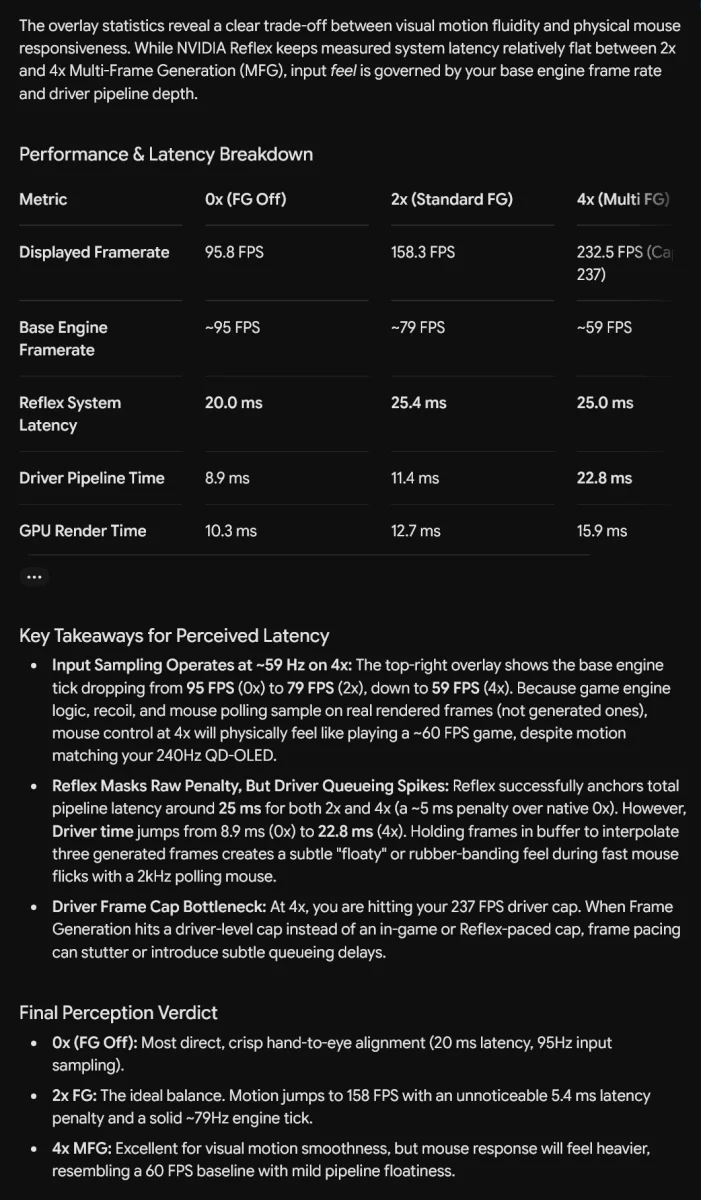
The verdict at the end is bang on really, 4x is more than playable, but 2x is the best balance as 5ms latency introduction going from an average 95fps to a locked 120fps offers a noticeable motion experience with no perceptible introduction of mouse input latency.
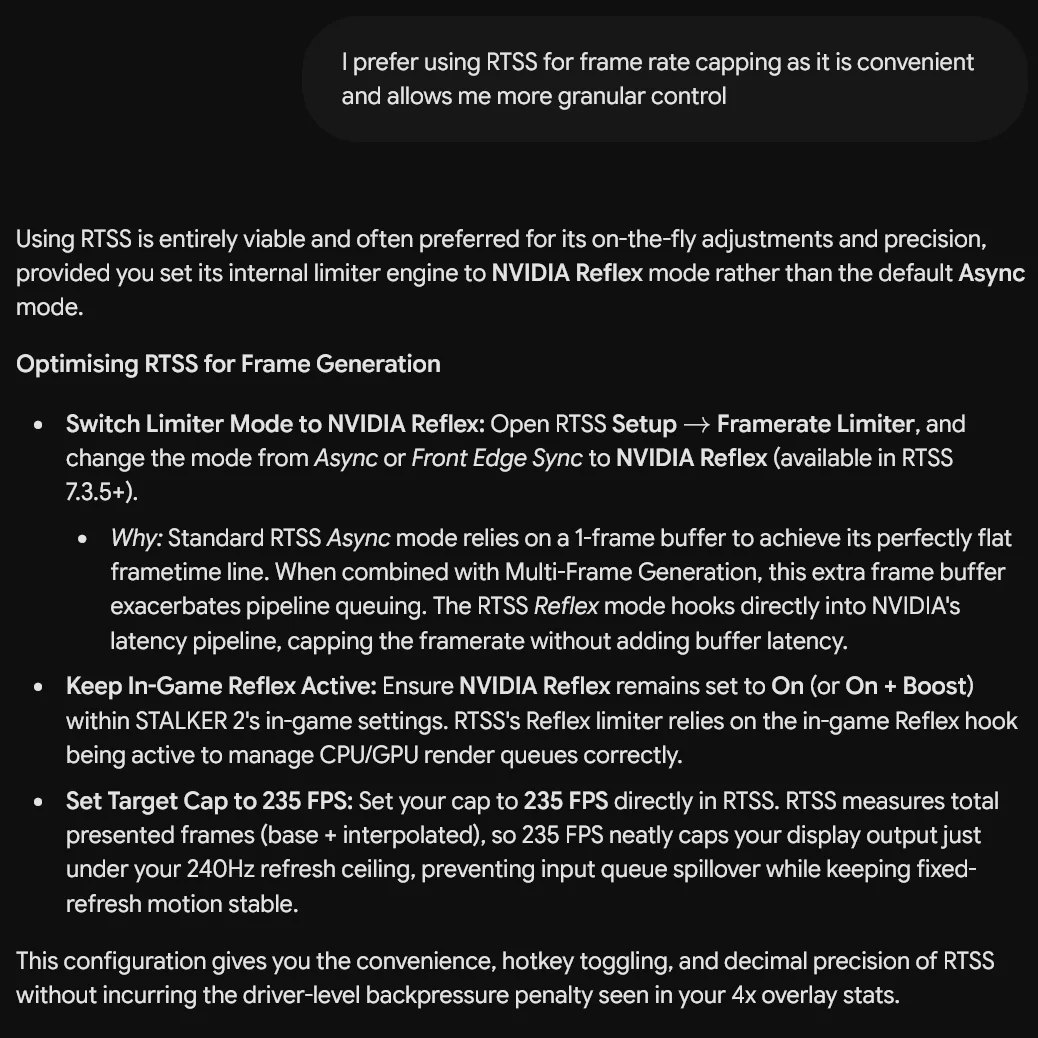
I noted my preference for RTSS since it uses Reflex hook anyway so adds no additional latency into capping like the Nvidia control panel or NVapp driver level global cap does, Gemini said:
An interesting test in an engine I wasn't expecting to fare so well with injecting a mod this way.
The takeaway from this is I learned having the max fps cap in the nvidia driver is not the most optimum way because that cap is applied at the end of the pipeline, not at the start which is where Reflex is doing its thing (and in turn RTSS with its Reflex hook).
So optimum usage is Gsync on + Vsync on for those who don't notice any OLED VRR flicker, for those who do on their displays, both off and set your framerate caps either ingame or with RTSS and have reflex on. This keeps end to end latency as low as possible and the GPU driver is not adding any extra ms into the render pipeline.
Nvidia low latency mode etc are obsoleted by Reflex so these legacy settings can be disregarded.
My optimum routine then is if a game offers a max fps cap and reflex as settings in the menu, then I have that set to 235fps/237fps and Reflex on, then RTSS is used to cap a lower fps is desired to control GPU noise/thermals etc. Nvidia driver global fps cap is now always off. I do not use Gsync on + Vsync on because on my OLED I notice VRR flicker, and am more than happy with how smooth things are with panning motion with a fixed refresh rate + manual cap instead.
1. The "Very High Dynamic FPS" Reflex Limiter Bug
When NVIDIA Reflex dynamically limits your framerate (capping you at ~225 FPS on your 240Hz screen), it measures CPU/GPU render times on the fly. If a specific game exhibits frame-time spikes at the top end, applying a hard Max Frame Rate cap of 232 FPS directly in NVCP acts as a rigid safety net, preventing Reflex's dynamic limiter from overshooting or oscillating. Otherwise You might occasionally notice a single frame hitch or micro-stutter right as you hit the 225 FPS ceiling.
2. Apparently certain Unreal Engine titles bypass the driver-level Low Latency fallback setting entirely if they execute custom frame-pacing scripts. If you ever play a non-Reflex game and notice the counter sitting locked directly at 240 FPS instead of ~225–232 FPS, manually cap the frame rate to 232 FPS in NVCP for that specific game profile.
I found it hilarious it thinks 5090 in 4k can ever push modern unreal games to 240fps on high details, even with DLSS P, but ok, an edge case.

That said, it completely confirmed with multiple sources what I said about LLU in drivers being a very good fallback limiter for games without reflex. It's native, reflex in games override it and it just works.
Last edited: