

-
Notice regarding image hosts and attachments. See here.
You are using an out of date browser. It may not display this or other websites correctly.
You should upgrade or use an alternative browser.
You should upgrade or use an alternative browser.
Windows 10
- Thread starter Glaucus
- Start date
More options
Thread starter's posts


Friends laptop is having issues with the creators update, all seemed to install OK but now edge force closes after a few seconds.
Tried the app troubleshooter which says the windows store licence is corrupted and fixes it but makes no difference to edge.
Easy fix is don't use edge but sadly they need it for work applications.
Tried the app troubleshooter which says the windows store licence is corrupted and fixes it but makes no difference to edge.
Easy fix is don't use edge but sadly they need it for work applications.

Soldato
- Joined
- 19 Oct 2006
- Posts
- 3,712
Friends laptop is having issues with the creators update, all seemed to install OK but now edge force closes after a few seconds.
Tried the app troubleshooter which says the windows store licence is corrupted and fixes it but makes no difference to edge.
Easy fix is don't use edge but sadly they need it for work applications.
Any internet security products installed or trusted rapport?
Any internet security products installed or trusted rapport?
That was it, they had rapport installed. Removed and all working again.
Remember having issues with it in chrome, caused really high CPU usage.
Cheers
Soldato
- Joined
- 19 Oct 2006
- Posts
- 3,712
I'm sure its improved since then . . .

tempted to give W10 another go.....creating a VM to see what its like.
is there any tools to disable all the privacy stuff and to remove all the built in junk to W10?
Yes there is.
https://www.oo-software.com/en/shutup10
That'll do everything you need.
thanks a lot
That is shockingly bad.I'm sure its improved since then . . .
I hope they've improved it since then.
Soldato
- Joined
- 19 Oct 2006
- Posts
- 3,712
Well IBM purchased it so you hope so.



Soldato
- Joined
- 17 Aug 2003
- Posts
- 20,167
- Location
- Woburn Sand Dunes
That's interesting, that's the second time on these forums that ive read that somebody's ended up with a hosed windows install after using cccleaner to delete the windows.old folder.
Last edited:
Soldato
- Joined
- 17 Aug 2003
- Posts
- 20,167
- Location
- Woburn Sand Dunes
You're right and they used cccleaner as well. Very strange. I think the answer is to use disk cleanup to delete the folder instead and avoid 3rd party apps like cccleaner if you can.
That's interesting, that's the second time on these forums that ive read that somebody's ended up with a hosed windows install after using cccleaner to delete the windows.old folder.
It hosed one of mine after the creator's update and I didn't use cccleaner just removed the windows.old folder through the built in Disk Cleanup - I had my suspicions something was going to go wrong though when it was telling me it could clear up 24GB out of the 26.5GB used by the OS on the drive
 but as I was having issues with it anyway I was like **** it. Fortunately was pretty simple to get it working again via recovery afterwards.
Thanks for that, very useful. Do the settings to stop windows updates actually work? Can you just do a manual check and update like in the past?
Soldato
- Joined
- 19 Oct 2006
- Posts
- 3,712
I would not bother with CCleaner personally it seems to cause more harm than good these days.
Last edited:
Windows 10 strikes again - tablet started spending (hadn't done any updates) 5 minutes on random "customising your experience" or "setting up Windows for you" screens when shutting down and some control panel entries were completely jumbled - in the worst case the battery tab was renamed Overview and the page was a jumble of mixed up labels with it showing 66 hours instead of 66% and saying fully charged when it plainly isn't the rest is just random labels from the page including the checkbox for "Slider to adjust percentage of battery threshold setting" where a slider should be that allowed you to set the battery level to notify you as low and a slider that lets you set the estimated time to full charge lol.
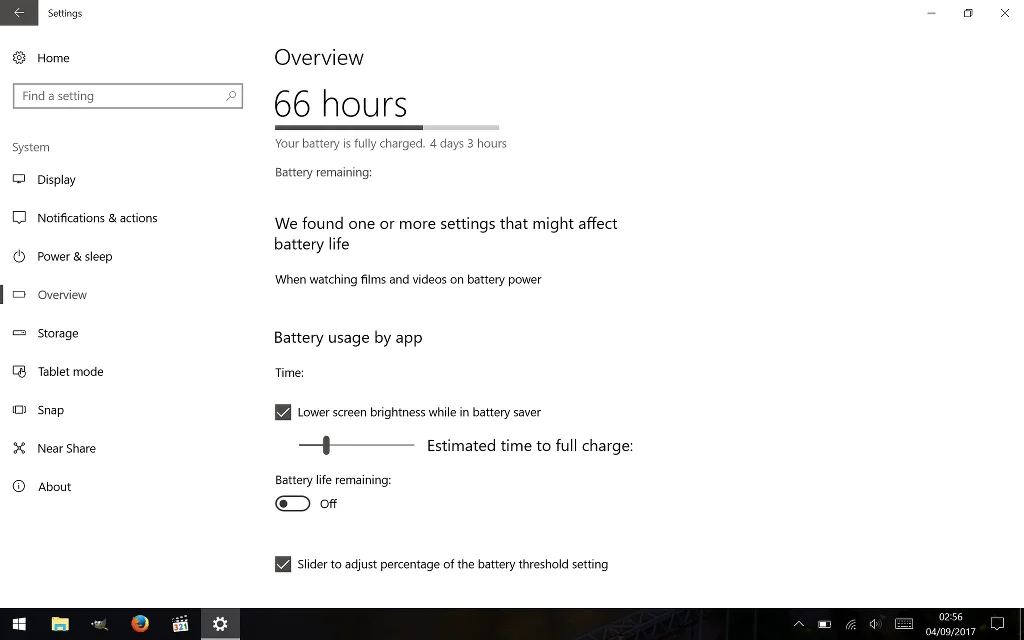
3rd time I've had to do a complete recovery of the OS since the creator's update - as this is the GPD Pocket I've no choice but to use Windows 10 or Ubuntu but Ubuntu doesn't cover my needs.
3rd time I've had to do a complete recovery of the OS since the creator's update - as this is the GPD Pocket I've no choice but to use Windows 10 or Ubuntu but Ubuntu doesn't cover my needs.
Which Atom cpus do not work correctly with the creators update?
I have a 2009 Asus Eee Netbook purchased in 2009 - with an Atom and 2GB memory (updated after purchase from 1GB). This won't update. Apparently any Atom cpu pre 2013 is not supported by Creator's edition. It tried, got nearly there and then said couldn't install and went back to previous edition.