• Notice regarding image hosts and attachments. See here.

Why you SHOULD be using Firefox

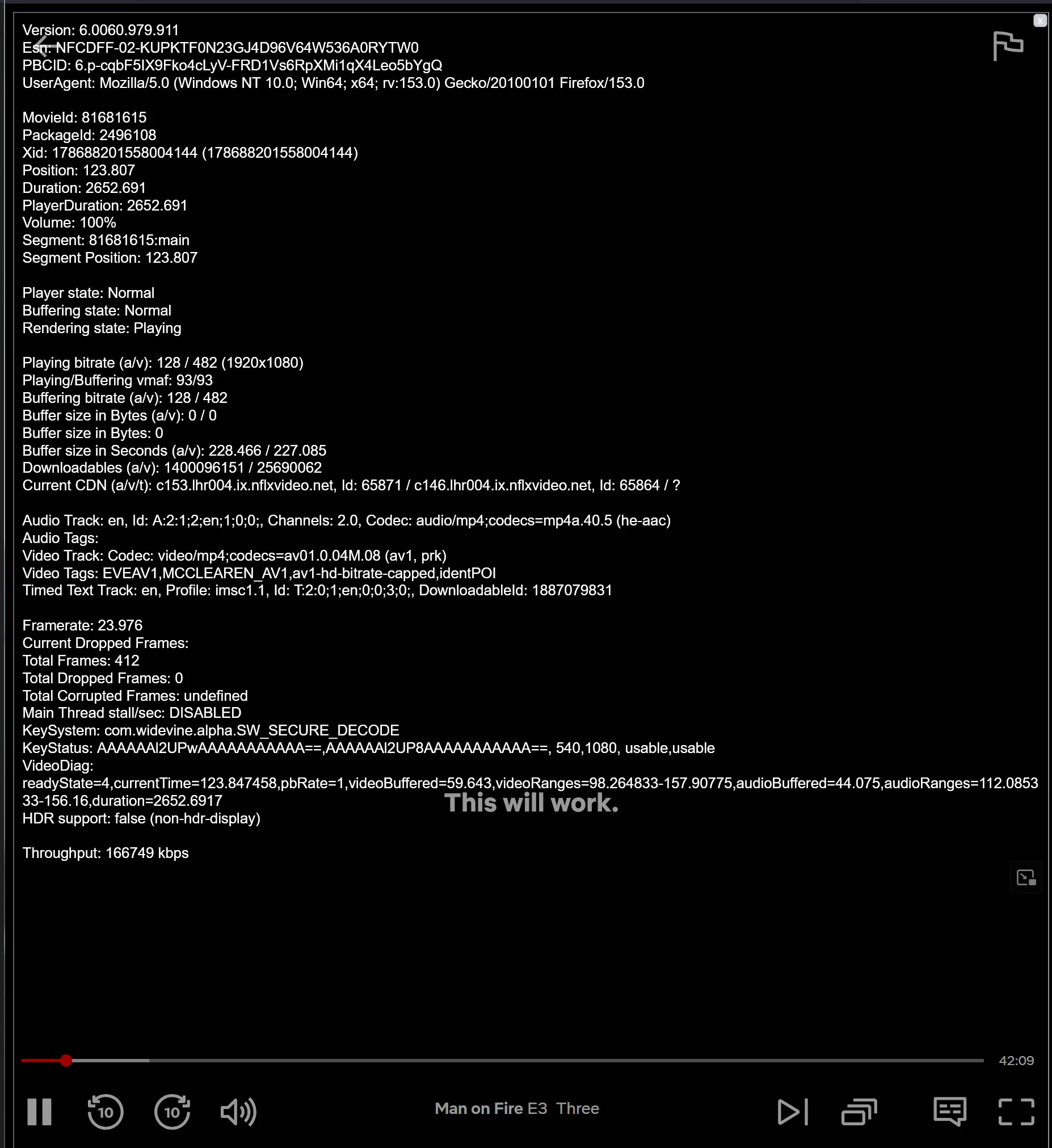
Yes 1080p has worked natively in Netflix for over a year, I know this because I have no extra extensions installed and when playing on Netflix and pressing CTRL+ALT+SHIFT+D it states 1080p is being used with AV1.

1786882048793.webp
 
Last edited:
It was supposedly released ages ago in v132:

But there's zero mention of it in a recent mozilla DRM article which only talks about Widevine and HTML5:

I can't test it on the potato PC I'm using at the moment. I do recall an extension you could install to get 1080p to work but it stopped working at one point; there may well be newer extensions or other methods but netflix support website now says it officially supports 1080p in Firefox.

Over the years they have raised the DRM minimum hardware requirements so DRM content stopped working on some old PC's that it previously worked on without issue. DRM is a double edged sword I can understand why they want to protect their content but it can stop genuine customers from streaming. The same can be said with DRM in gaming where people with unreliable internet are left unable to even launch some single player games they have paid for if they are offline.
If DRM worked I could understand it, but the simple fact is that it doesn't. Pretty much all Netflix shows are available in 4K on pirate sites, and even if their DRM protection wasn't broken there's nothing they can do to stop them from bypassing HDCP and doing a screen capture with minimal quality loss. The only thing DRM does is harm paying customers.
 
If DRM worked I could understand it, but the simple fact is that it doesn't. Pretty much all Netflix shows are available in 4K on pirate sites, and even if their DRM protection wasn't broken there's nothing they can do to stop them from bypassing HDCP and doing a screen capture with minimal quality loss. The only thing DRM does is harm paying customers.
Oh I don't like drm either, some people have even lost access to content they thought they had purchased when a platform removed it but if it was all drm free then a lot more people would probably be downloading and sharing content.

Netflix makes a lot of their own stuff but when a platform has paid for the broadcast rights for something for a set period it wouldn't surprise me if they have to agree to certain drm restrictions so it's the people making the content as well not just the platforms that host it.
 
It was supposedly released ages ago in v132:

But there's zero mention of it in a recent mozilla DRM article which only talks about Widevine and HTML5:

I can't test it on the potato PC I'm using at the moment. I do recall an extension you could install to get 1080p to work but it stopped working at one point; there may well be newer extensions or other methods but netflix support website now says it officially supports 1080p in Firefox.

Over the years they have raised the DRM minimum hardware requirements so DRM content stopped working on some old PC's that it previously worked on without issue. DRM is a double edged sword I can understand why they want to protect their content but it can stop genuine customers from streaming. The same can be said with DRM in gaming where people with unreliable internet are left unable to even launch some single player games they have paid for if they are offline.
Yeah that 132 release page states it was going to be rolled out gradually via a/b testing, given its all quiet I expect they have bailed out of it for now. It does look like given the post above though, they allowing 1080p on widevine now.
 
Last edited:
So Firefox 154 just released with a favicon fix...

However an issue I have had for years now is still not fixed.

Add Santander as a bookmark and notice how there is no favicon in the bookmarks bar...

I was hoping FF154 would fix that.
 
Seeking and scrubbing on YouTube and other supported video sites is now up to 10× faster, making videos feel more responsive as you watch.

Well it's in the patch notes so will have to see if you can actually feel the difference of this or not.
 
Add Santander as a bookmark and notice how there is no favicon in the bookmarks bar...
It's quite common for this to break, yeah. Been a thing for years at this point.
Delete your icon cache. favicons.sqlite

Could also try the new fix beforehand
Performing a hard reload on a page (holding Shift while clicking the Refresh button) now also clears and updates its cached favicons.

Firefox now asks for my master password each time I launch it, since updating it today.
Turn it off in settings, then?
 
Last edited:
It's quite common for this to break, yeah. Been a thing for years at this point.
Delete your icon cache. favicons.sqlite

Could also try the new fix beforehand

I tried the new fix, it didn't work. I just think that the Santander favicon doesn't work with FF.

Works perfect in Edge and Chrome though.

It's not a big deal, just annoying.
 
Last edited:
The latest 155 beta introduces HJappy Eyeballs V3 which uses concurrent checking of websites to load them faster based on the method that responds the fastest - Kinda neat feature. Look forward to that in release channel.

Meanwhile, the new release chan update adds 10x seeking improvement to youTube and other streaming sites:

Smoother video playback​

Seeking and scrubbing on YouTube and other supported video sites is now up to 10× faster, making videos feel more responsive as you watch.

Tested on YouTube and seems to be accurate.

Turn off my master password? I shouldn't have to do that.

1787097547799.webp


It specifically states you must enter it each session, iirc it has always said this?

If you are simply protecting your saved passwords then instead enable device sign-in which prompts for your OS code to view and access saved passwords behind encryption:

1787098067590.webp


Under:

1787097742482.webp


This is also useful for securing with an extra layer stored payment details for shop sites etc.

Now you will only get asked for the PIN/password you set under Windows device sign-in once that session instead of on every launch of FF which is what Primary Password does and is a bit pointless when device sign-in exists. With mine I just enter a PIN once I choose to view a password or enter a stored payment card on a web store and that is it.


Edit( Can now set system wide icon in settings too with the new update:

1787098851369.webp
 
Last edited:
1787097547799.webp


It specifically states you must enter it each session, iirc it has always said this?

If you are simply protecting your saved passwords then instead enable device sign-in which prompts for your OS code to view and access saved passwords behind encryption:

1787098067590.webp


Under:

1787097742482.webp


This is also useful for securing with an extra layer stored payment details for shop sites etc.

Now you will only get asked for the PIN/password you set under Windows device sign-in once that session instead of on every launch of FF which is what Primary Password does and is a bit pointless when device sign-in exists. With mine I just enter a PIN once I choose to view a password or enter a stored payment card on a web store and that is it.
The problem is, that v154 asked for my password on homepage, when previous versions simply didn't do this. I know you have to enter the master password on a new session of Firefox before it will autofill passwords and I've no issue with that - just it asking for the master password on my homepage.

I don't know why, but Firefox has stopped asking for my password on each launch now, even though I haven't changed anything. So I'll leave things be for me and hope it was just a one-off glitch in the matrix. ;)
 
The latest 155 beta introduces HJappy Eyeballs V3 which uses concurrent checking of websites to load them faster based on the method that responds the fastest - Kinda neat feature. Look forward to that in release channel.

Meanwhile, the new release chan update adds 10x seeking improvement to youTube and other streaming sites:


Tested on YouTube and seems to be accurate.


1787097547799.webp


It specifically states you must enter it each session, iirc it has always said this?

If you are simply protecting your saved passwords then instead enable device sign-in which prompts for your OS code to view and access saved passwords behind encryption:

1787098067590.webp


Under:

1787097742482.webp


This is also useful for securing with an extra layer stored payment details for shop sites etc.

Now you will only get asked for the PIN/password you set under Windows device sign-in once that session instead of on every launch of FF which is what Primary Password does and is a bit pointless when device sign-in exists. With mine I just enter a PIN once I choose to view a password or enter a stored payment card on a web store and that is it.


Edit( Can now set system wide icon in settings too with the new update:

1787098851369.webp
You've blanked out the embed, but the attachment still shows everything!
 
How is firefox with ublock or similar popup with YT? Is it able to block the adverts properly

Still on brave, where it correctly blocks YT ads without a sweat
 
Back
Top Bottom