Windows 10

The Win10 upgrade polava was indeed a hellish ride for me.

Im lucky in that I have loads of PCs and even right now as I speak, I have both my main AMD and Intel, plus my opteron Server, all setup and running 100% identical and all on the KVM and all with the same software installed all the same way and even the Icons are all setup in the same way, and the ONLY difference is the O/S they are running on... Win 7, 8.1 and 10 ( 64Bits of course ). Dunno why, Im just being Anal right now.

But I have been using NEVER10 on the 7 and 8.1 setups while the 10 setup I have only just a few weeks ago, given it a full fresh reinstall.

The Media PC on the other hand has been a right old bumpy ride.

I am using Windows Media Center on it, and its setup nicely and runs great. I have gone through a number of various options and other Medis center options, but nothing comes even close to working as well as Windows Media Center when it comes to recording TV.

Now, first off, I upgraded to Windows 8 when that came out and I was met with complete horror when Windows Media Center stopped working. I had to go back to 7 so I could get WMC back.

Of course, that was my own issue, and I learned the hard way about MS dropping support for WMC, but I also found out, that you can get a version of Win 8 with WMC and so I got that, and this let me upgrade to 8 and I was happy again... For a short while...

Win8 had the stupid little Win10 icon on the bottom of the screen for a short while, and I avoided it of course, but then a few weeks ago, it decided that it was going to upgrade itself for me.

Maybe the kids did it, I dont know, they said they did not, but kids are kids and that lost WMC once again.

So I then put Win8.1 back onto the Media PC yet again, but this time, I had thankfully found NEVER 10 and I shoved that onto it as early as I could and its been a little life saver for me.

Now, as to my main PC, I was running 10 on it and I was for the most part, happy as I could be, except my SoundCard started to play silly buggers, and so I bought a new one, and thats even worse, in random ways... The firts cards is running great under Windows 8.1 in its new home, and the other card I have chucked that back into its box as I hope to get a refund for it... Windows 10 hatyes these soundcards it seems.

So, I am no longer much of a lover of Windows 10. It has plenty of great bits that make it better than 8 but overall, its just not good enough and I have gone back to Windows 7 for my main PC... For now.

 
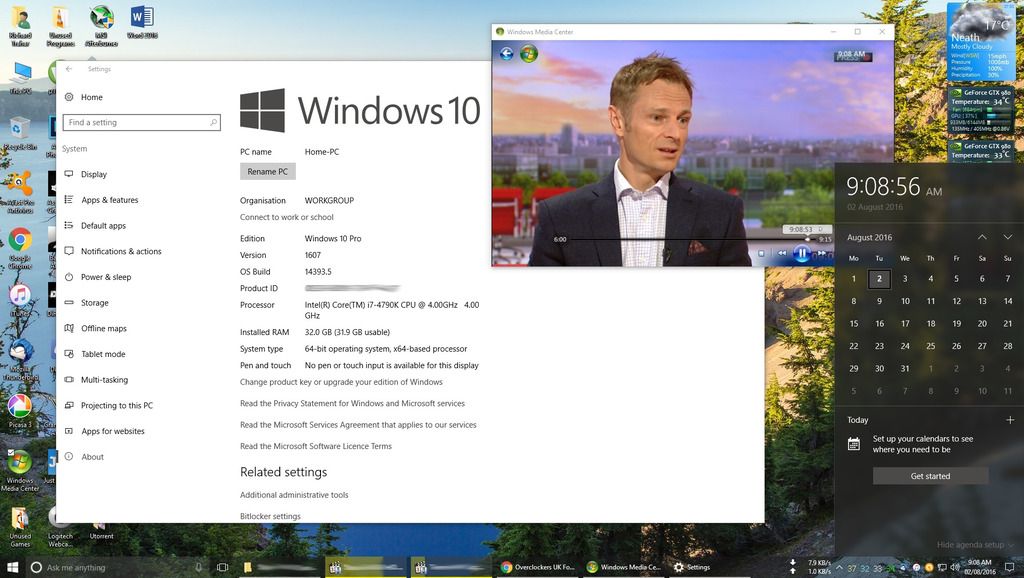
Upgraded from the latest public Windows 10 version to the anniversary update (14393.5) last night via the the ISO install method. Update over top took about 20mins and everything worked perfectly. Just logged in and used it like nothing had changed.

Extremely fast and smooth upgrade for me.

The only one issue that I have is running the division, alt tabbing to something else minimises the game ok, but it's missing from the taskbar yet it's still running in the background and I can't switch back to it.

Other than that I have no complaints whatsoever, even a copy of WMC I have works great as it did before so I can still watch and record freeview.
 
HOW?

WMC does not work in 10 - There is a work around to get it to work, but its not supported.

It's available on the link below but it's not official, have been using it for many months without issues. Takes seconds to install and can be used instantly without rebooting and everything functions perfectly.

The download file is only around 57mb.

http://forums.mydigitallife.info/th...ws-10-final-amp-possible-alternatives/page573

Here is a quick screenshot taken a few minutes ago of BBC One HD.

Have tried other programs but nothing comes close to the ease of use as WMC and MS should never have scrapped it.

Clipboard01_zpsn8wi46au.jpg
 
Last edited by a moderator:
wow, I got it in too... Simple as anything.
Only issue was trying to find the ruddy icon, but once I got it, its done.

Many thanks.

Oh, Agreed on the ease of WMC compared top anything else... Its many leagues above and beyond anythign else for recording TV.
The only issue I have with it, ( and this is so pathetic ) is that if I used another Media Player to play bnack the video files it saves, the audio is often blank.
I found out that the audio is often stored in channel 2 instead of channel 1 and you need to manually set the audio to use 2 andit would be ok.

Again, a stupid iffy point, but one that got me for a while.
 
Last edited:
upgraded tonight without a fresh install or anything for the first time ever and was impressed. Everything went so smooth.

only issue is edge extensions didn't apply the first time but a reboot fixed it
 
mine started updating last night (downloading) got to 50% and I needed bed so will continue today when I get home - hopefully its smooth and I don't lose my tweaks
 
Media Centre appears to have stopped working after the update. I've tried reinstalling it but no go. Does anyone know how to get it going again?
 
Upgrade was easy enough though why it saw fit to completely reset my graphics card settings and soundcard settings is beyond me.
 
I've upgraded my Surface Pro 3 from Win 8 to Win 10. On Win 8, I liked the app view by most used, because I could easily see all my most used apps. On Win 10, for most used, I can currently only see about 6. Is there a way I can change this to get a fuller list of most used apps? Thanks.
 
The upgrade came through for me last night. As a result my printer now doesn't work and I've also lost audio. Annoyed. :(
 
For me the upgrade removed my (perfectly working) USB 3 drivers because there's some kind of standoff between MS and Intel over who's job it is to do new drivers. Apparently my PC no longer meets the minimum requirements to install the Intel drivers.

Luckily someone has edited the .inf files and recertified them so that the drivers can be re-installed, but you need to have a non-intel USB controller to connect your keyboard/mouse to, as you lose the USB when you start manually installing drivers. I didn't have any PS2 mice about, so I did it from another PC using Remote Desktop.
 
Last edited:
Mine obliterated my partition table on my 1tb hard drive.

Might be a coincidence, might not but hey ho.

Testdisk to the rescue.
 
After update it switched back on the Game DVR which in turn, for reasons that escape me, now caused the Windows Desktop Manager service to crash & restart every time right clicked on an open app on the taskbar. In the end I disabled the Game DVR via the registry & used CCleaner to uninstall the XBox app. Problem now solved but 'fun' for about 30 mins. :(
 
My upgrade also didnt go so well, well the upgrade process seemed to be fine and booted back to the desktop afterwards but it went wrong after that, it couldnt locate my 500GB D Drive and it essentially froze up Explorer, I tried to restart but that froze too.

Reset but got the dreaded BCD error, booted into recovery, but it couldnt fix it!! After some messing around I worked out that for some reason my boot partition was actually on my D Drive, so I unplugged that drive, did recovery again and it then installed the correct boot tables onto my main SSD and allowed me to boot up.

It all seems to be working ok now, although not extensively tested it yet.
 
I've upgraded my Surface Pro 3 from Win 8 to Win 10. On Win 8, I liked the app view by most used, because I could easily see all my most used apps. On Win 10, for most used, I can currently only see about 6. Is there a way I can change this to get a fuller list of most used apps? Thanks.

Can anyone help with this?
 
Back
Top Bottom